
Once you’ve chosen a game to play and hit the Play and Earn button to support your favorite content creator, you can track your progress on ongoing missions in the Mission tab.
What You’ll Find in the Missions Tab:
- Creator Supported: The content creator you’re supporting.
- Mission to Complete: Tasks you need to finish, such as installing a game or unlocking a level.
- Points to Be Rewarded: Points you will earn once the mission is complete, along with your progress toward the next point level.
Reviewing Mission Details:
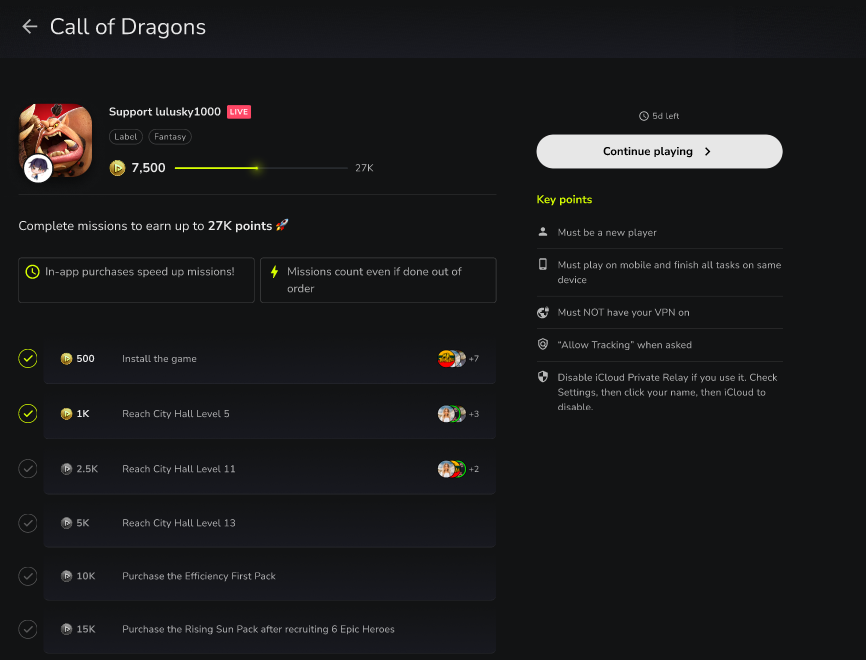
- Click on a Specific Game: Open the game to see all mission details.
- Review Goals: Check out all the objectives you can complete to earn more points.
- Understand Requirements: Carefully read the key points and requirements, as these may vary between games.
General Requirements for Valid Participation:
- New Player: You must be a new player for the game.
- No VPN: Do not use a VPN during gameplay.
- Allow Tracking: Enable tracking when prompted.
- Disable iCloud Private Relay: If using an iOS device, turn off iCloud Private Relay.
Note: Sometimes, missions can take up to 1 hour to be properly registered.
Read this article to learn how to make sure your missions are tracked and completed.
Get ready to complete missions, earn points, and support your favorite creators! 🎮✨
Comments
3 comments
Hola XD
Bueno
Please fix certain missions that have no way of tracking them. Example on Mech Arena “collect 15000 A-coins” There is no progress bar and no way in game to track the total amount earned.
Please sign in to leave a comment.